



All Classes
All Classes
TOD, PREP, KG, I, II, III, IV, V
VI, VII, VIII, IX, X, XI & XII
TOD – XII
No transaction Fees*
All Classes
Page is under construction

All Classes
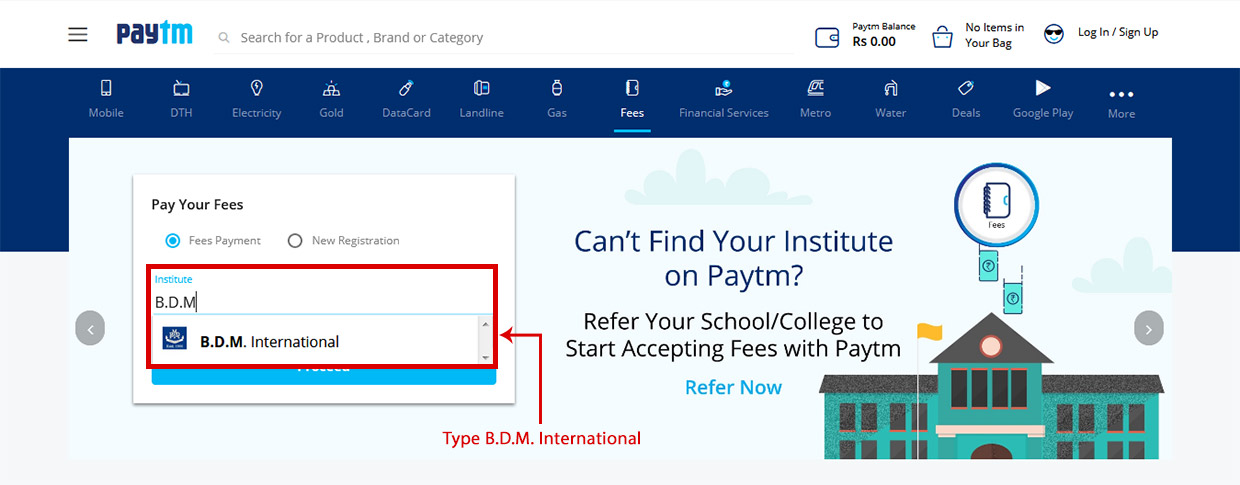
2. ‘B.D.M. International’ should be selected by default, If not then start typing B.D.M. as Institute’s name and then select ‘B.D.M. International’ as shown in the screenshot
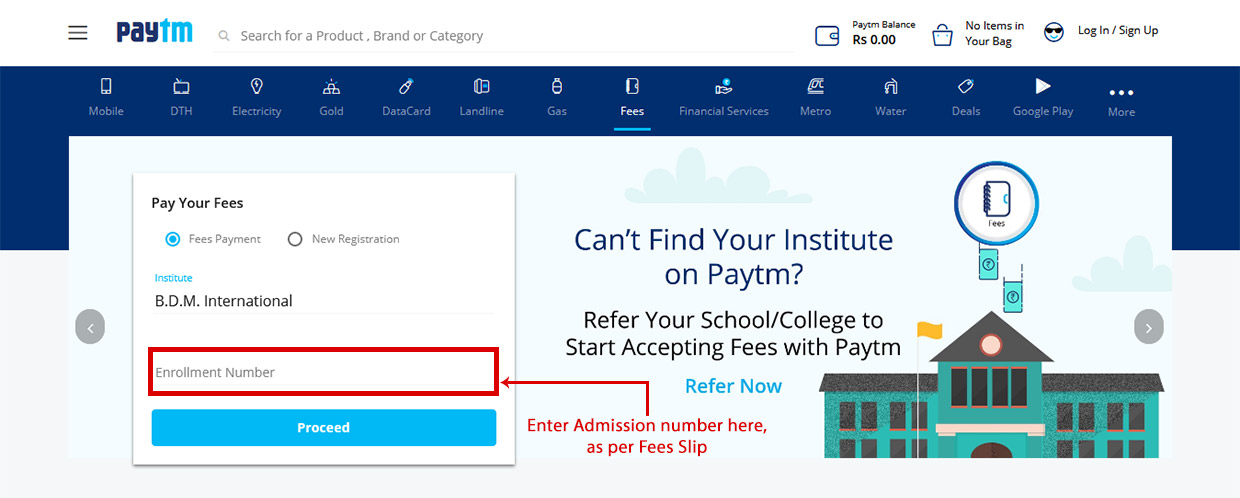
3. Enter student’s Admission Number as per Fees Slip, for Enrollment Number.
4. Click on ‘Proceed’ to pay through Paytm wallet or other options provided by the paytm
5. After successful transaction save the transaction receipt as a reference for future
TOD, PREP, KG, I, II, III, IV, V
| Classes | Bank To Pay |
|---|---|
|
TOD, PREP, KG, I, II, III, IV, V |
– IN ALL BRANCHES OF

|
| Payment Instructions | |
| 1. Click on ICICI Eazypay buttons | |
| 2. Enter student Admission No & your mobile number & Click on Show Details | |
| 3. Enter OTP received on Mobile & Click on Submit | |
| 4. View fees | |
| 5. Accept terms & condition by clicking the check box | |
| 6. Select mode of payment : Debit Card, Credit Card, Net banking | |
| 7. Debit Card/Credit Card : You will be directed to pay through Bank Debit Card | |
| 8. Net banking : You will be directed to multiple banks for payment | |
| After the payment is being made the system will show the status of the transaction; if successful a receipt will be generated which can be kept for further reference | |
|
THE BANK TIMINGS FOR DEPOSIT OF OFFLINE FEES WILL BE FROM 9.30 AM TO 1 PM KINDLY NOTE THERE WILL BE NO OPTION TO PAY AT THE SCHOOL COUNTER. FOR FURTHER INFORMATION PLEASE CONTACT SCHOOL OFFICE (033 2435-8434) BY ORDER SCHOOL MANAGEMENT |
|
VI, VII, VIII, IX, X, XI & XII
| Classes | Bank To Pay |
|---|---|
|
VI, VII, VIII, IX, X, XI & XII |
– IN ALL BRANCHES OF

|
| Payment Instructions | |
|
THE BANK TIMINGS FOR DEPOSIT OF OFFLINE FEES WILL BE FROM 9.30 AM TO 1 PM KINDLY NOTE THERE WILL BE NO OPTION TO PAY AT THE SCHOOL COUNTER. FOR FURTHER INFORMATION PLEASE CONTACT SCHOOL OFFICE (033 2435-8434) BY ORDER SCHOOL MANAGEMENT |
|
TOD – XII
No transaction Fees*
1. Please click on the link: https://tinyurl.com/y69anykk
2. Select the respective branch- BDM International
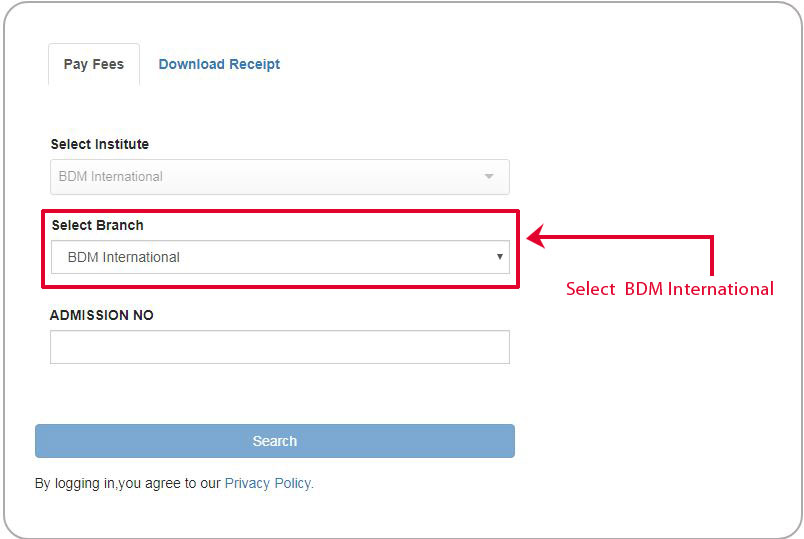
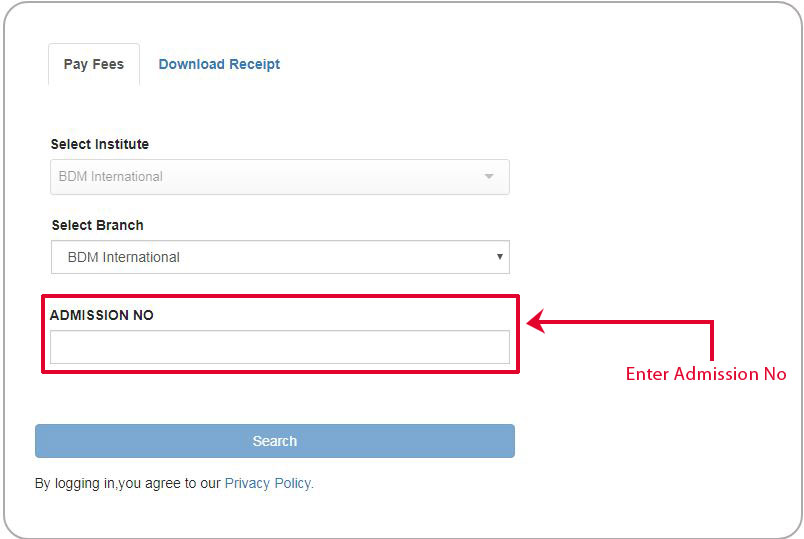
3. The student will type (ADMISSION NUMBER) in the respective field.
4. After login student has to select their fees and click on Continue and Pay.
5. After a successful payment, the student can download the fee receipt.
*NOTE: There is no transaction charge on the fees paid . However, it may be applied in future without notice.
Only Online Payment is AcceptedPage is under construction
Page is under construction
| Classes | Bank To Pay |
|---|---|
|
Toddler to Class XII |
1. Click on ‘Pay through PayTM for the Session 2023-24’
2. ‘B.D.M. International’ should be selected by default, If not then start typing B.D.M. as Institute’s name and then select ‘B.D.M. International’ as shown in the screenshot.
3. Select Tuition Fee (2023-24).4. Enter student’s Admission Number as per Fees Slip, for Enrollment Number.
5. Click on ‘Proceed’ to pay through PayTM wallet or other options provided by the PayTM.6. After successful transaction save the transaction receipt as a reference for future.
| Classes | Bank To Pay |
|---|---|
|
Playgroup to XII
|
Pay through Kotak Mahindra Bank Session 2025–26 |
| Payment Instructions | |
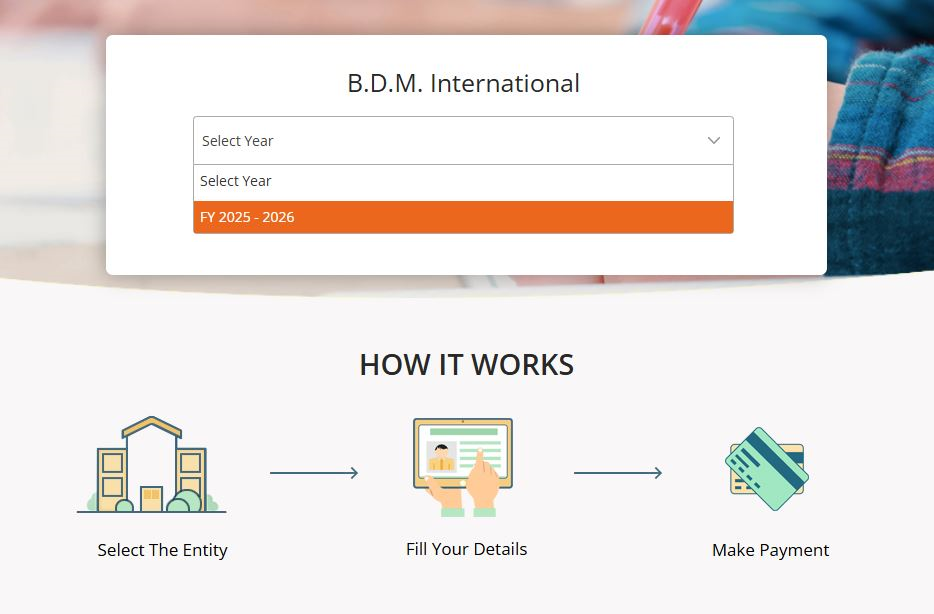
| 1. Click on “Pay through Kotak Mahindra Bank for the Session 2025–26”. | |
2. Select the FY 2025–2026.
|
|
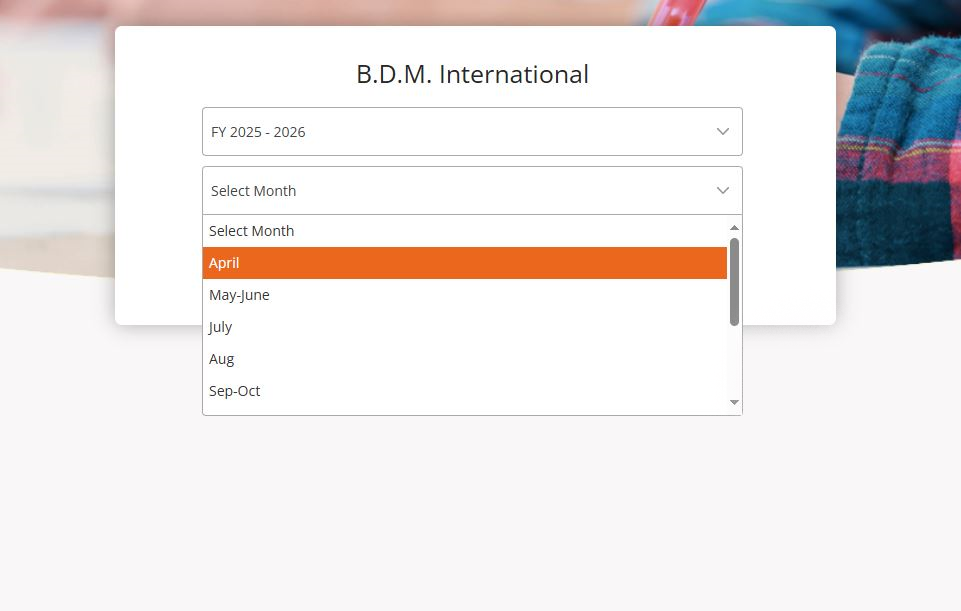
3. Select the month which needs to be paid.
|
|
4. Enter the Admission Number and click Submit.

|
|
5. Enter required details and click “Make Payment”.

|
|
| 6. After successful payment, download the fee receipt. | |
|
* No Transaction Fee
Note: Transaction charges may apply in future without prior notice. |
|
| Classes | Bank To Pay |
|---|---|
|
Playgroup to XII |
|
| Payment Instructions | |
| 1. Click on ‘Pay through Axis Bank for the Session 2025-26’ | |
2. Enter Student Admission No & Select Fee For the Month & Select Session & Click on Validate button |
|
3. Enter your class & Enter your E-mail Id & Enter your mobile number & Enter Generate Code & Click on sumbit button 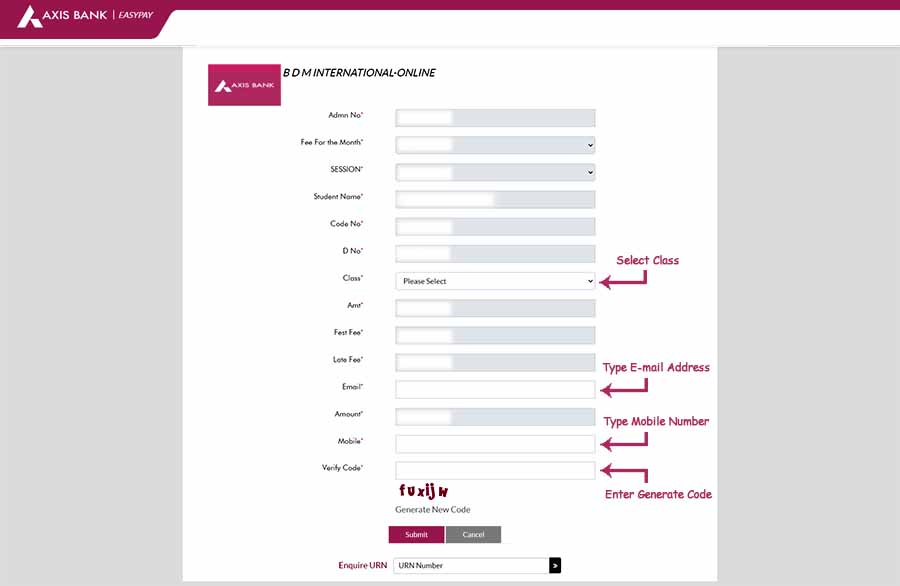 |
|
4. Then the fee details display on the screen & Accept terms and condition by clicking the check box & Select the payment method & then proceed to pay 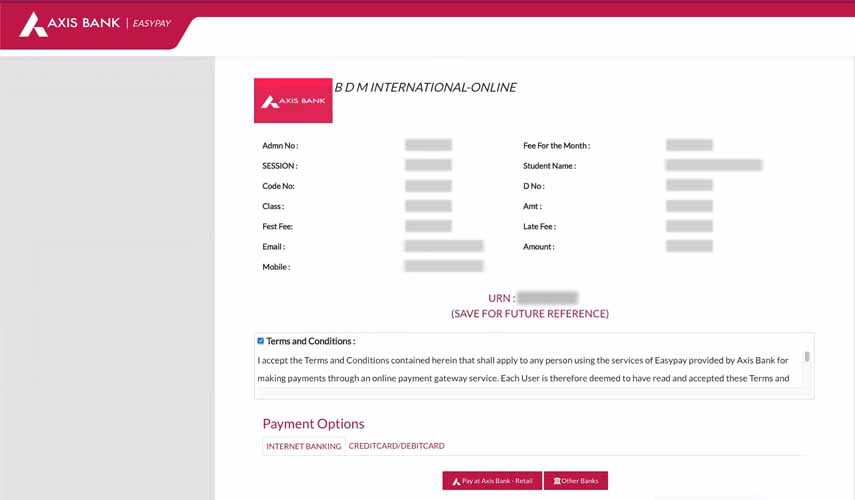 |
|
|
THE BANK TIMINGS FOR DEPOSIT OF OFFLINE FEES WILL BE FROM 10.00 AM TO 2.00 PM KINDLY NOTE THERE WILL BE NO OPTION TO PAY AT THE SCHOOL COUNTER. FOR FURTHER INFORMATION PLEASE CONTACT SCHOOL OFFICE (033 2435-8434) |
|
| Classes | Bank To Pay |
|---|---|
|
I – XII |
|
|
I – XII |